LED indicators on Datto Switches
The LED indicators on E and L series switches are used to provide status updates for the switch's operation.
If the firmware of your Datto Switch is older than version 1.03.24, to ensure uninterrupted device operation, see our Required Firmware Update for Datto Switches article for important information.
Environment 
- Datto E-Series Switches
- Datto L-Series Switches
Description
All Datto E and L series switches use the same LED layout. Each LED has its behavior described below:
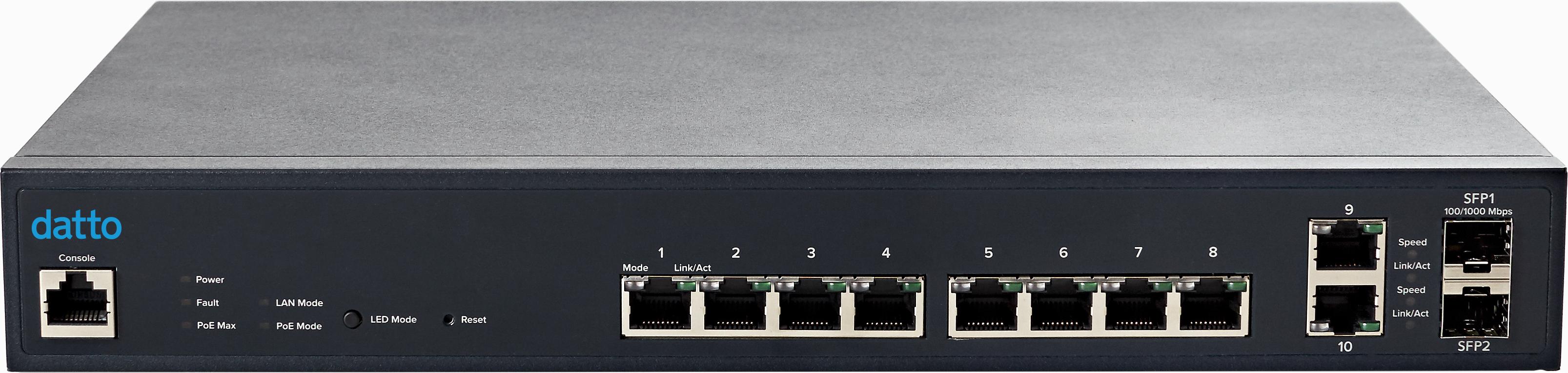
Power LED:
Light off = Power off.
Solid light = Power on.
Fault LED:
Light off = Normal Behavior.
Solid Light = An error is detected.
PoE Max LED:
Light off = Additional PoE device may still be added.
Solid Light = The PoE deviceÂ’s output power has exceeded total PoE limit. No additional devices can be powered on via PoE.
LAN Mode LED:
Light off = LAN mode is not activated.
Solid Light = LAN mode is activated.
PoE Mode LED:
Light off = PoE mode is not activated.
Solid Light = PoE mode is activated.
Mode LED (Per port):
Light off = No link is established on the port.
Solid Amber Light = A valid 10/100 Mpbs link is established on the port.
Solid Green Light = A valid 1000 Mbps link is established on the port.
Link/Act LED (Per port):
Light off = No link is established on the port.
Solid Light = A valid link is established on the port.
Blinking Light = Packets are transmitting through the port.


