HSDT Pooled Allowance Enforcement, Usage Reporting, and Alerting
Datto Secure Edge networks operate under a high speed data transfer (HSDT) pooled allowance. This article explains how the pooled allowance works, what happens when a network reaches it, and how to use the usage reporting and alerting features in Datto Network Manager to stay ahead of it.
How the HSDT pooled allowance works 
Each Secure Edge network receives a pooled HSDT allowance calculated across its licensed subscribers. The pool is shared: all subscriber traffic on the network draws from the same allowance. Each user is able to send data securely between their device and the Datto Secure Edge. High speed data, which enables users to send/receive between their device and the cloud gateway, at a default bandwidth of up to 100 Mbps, is provided until the data limit is reached. The data limit is equal to 100GB per user, shared across all users on the Network. For example, a network with 20 users will have a shared limit of 2TB of data per month pooled across the users.
The allowance resets at the start of each billing cycle.
NOTE Performance can vary based on environmental, upstream ISP and peering performance.
What happens when the allowance is reached
-
Network speeds are reduced for all users on the network, not only the subscribers responsible for the consumption. The data speed will be throttled to 2 Mbps until the end of the billing cycle.
-
Reduced speeds remain in effect until the allowance resets at the next billing cycle.
-
No users are disconnected, and no traffic is blocked.
Because the reduction is network-wide, a small number of high-consumption subscribers can affect the experience of every user on the same network. Monitoring consumption and configuring alerts is strongly recommended.
Usage reporting
HSDT usage reporting is available in Datto Network Manager from September 3rd, 2026.
To view usage: Navigate to Network Manager > Secure Edge > Connections to view usage information. 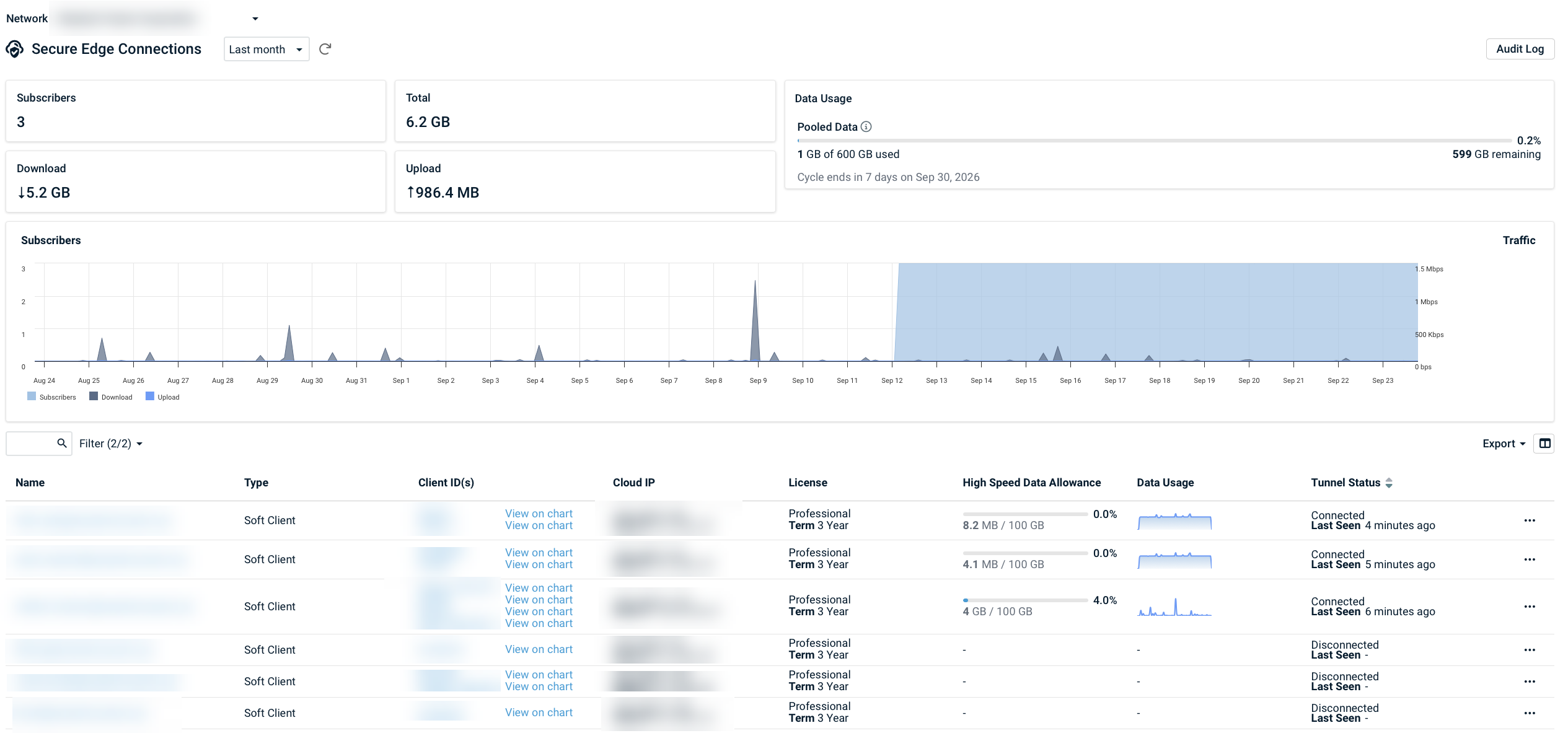
Reporting shows:
-
Total HSDT consumption for the current billing cycle, per network, against the pooled allowance.
-
Consumption per subscriber, with up to 30 days of historical data.
Configuring usage alerts
Alerts can notify you as a network approaches HSDT exhaustion and when exhaustion occurs.
To configure alerts: Managing alerts.
| Alert | Trigger | Delivery |
|---|---|---|
| Approaching exhaustion | Consumption reaches the set threshold of the pooled allowance | Email, PSA ticket |
| Allowance exhausted | Pooled allowance depleted; reduced speeds in effect | Email, PSA ticket |
NOTE PSA ticket dispatch requires a configured PSA integration.
Avoiding reduced speeds
-
Monitor consumption in Datto Network Manager and act on approaching-exhaustion alerts.
-
Review configuration. Contact Kaseya Support for configuration suggestions that may reduce HSDT consumption.
-
Increase the allowance. Contact your account manager to increase your network's HSDT pooled allowance.
Frequently Asked Questions
 Will users be disconnected when the allowance is reached?
No. Users remain connected at reduced speeds until the allowance resets at the next billing cycle.
Does the reduction apply only to the users who consumed the data?
No. The reduction applies to all users on the network.
When does the allowance reset?
At the start of the next billing cycle.
How do I know how close my network is to its allowance?
Use HSDT usage reporting in Datto Network Manager, and configure approaching-exhaustion alerts by email or PSA ticket.


